0.2.0What’s new

A faster drop-in replacement for the Firebase Local Emulator Suite

Keep your firebase.json, SDKs and ports, and change one word in your script. No Java to install, and your data survives restarts.

npm install --save-dev firenook
Get started
40×
faster writes5.1 ms against 208.2 ms, median
10×
less memory2.11 GiB against 22.57 GiB at peak
0.59 s
to restart with your dataagainst 30.8 s
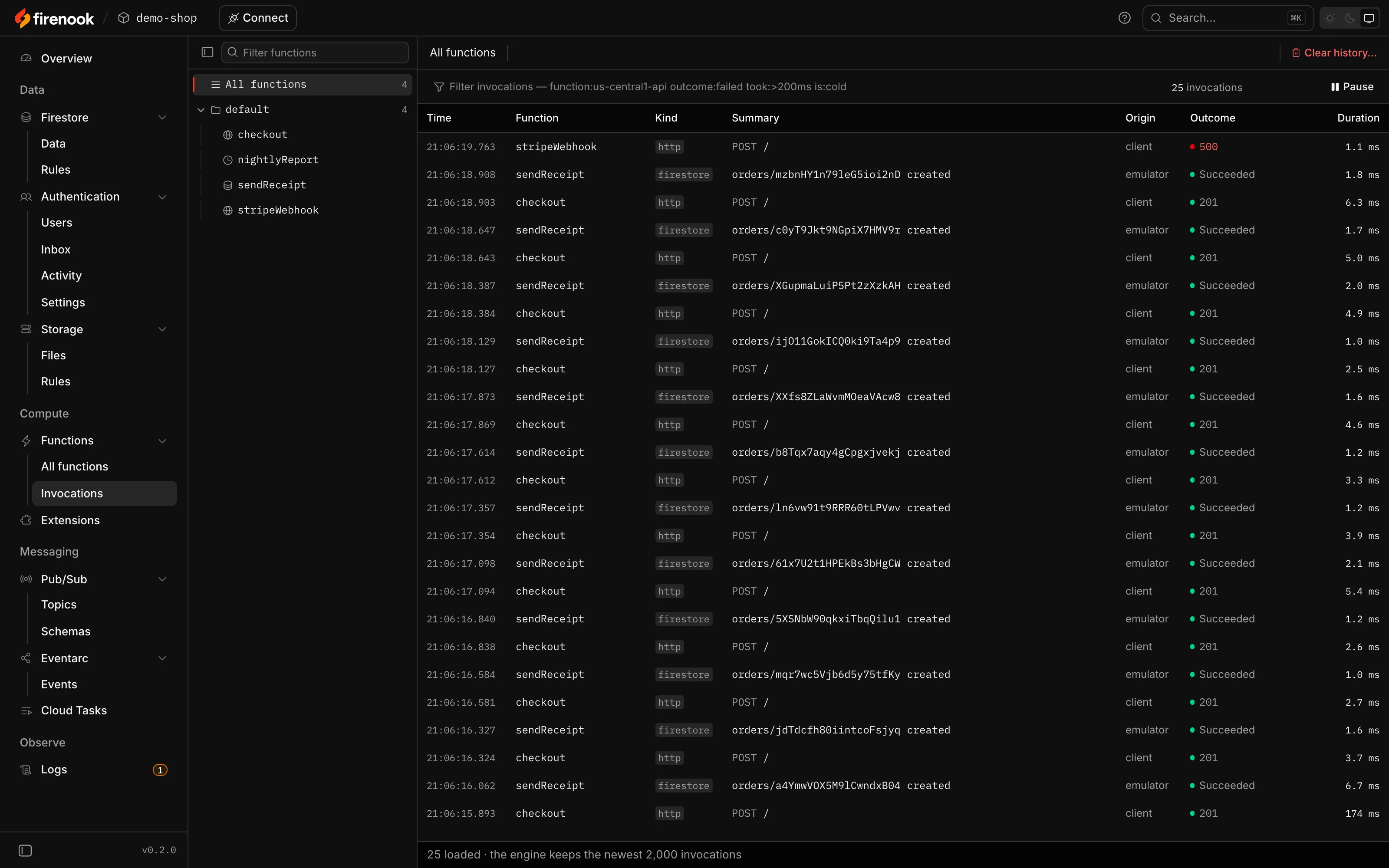
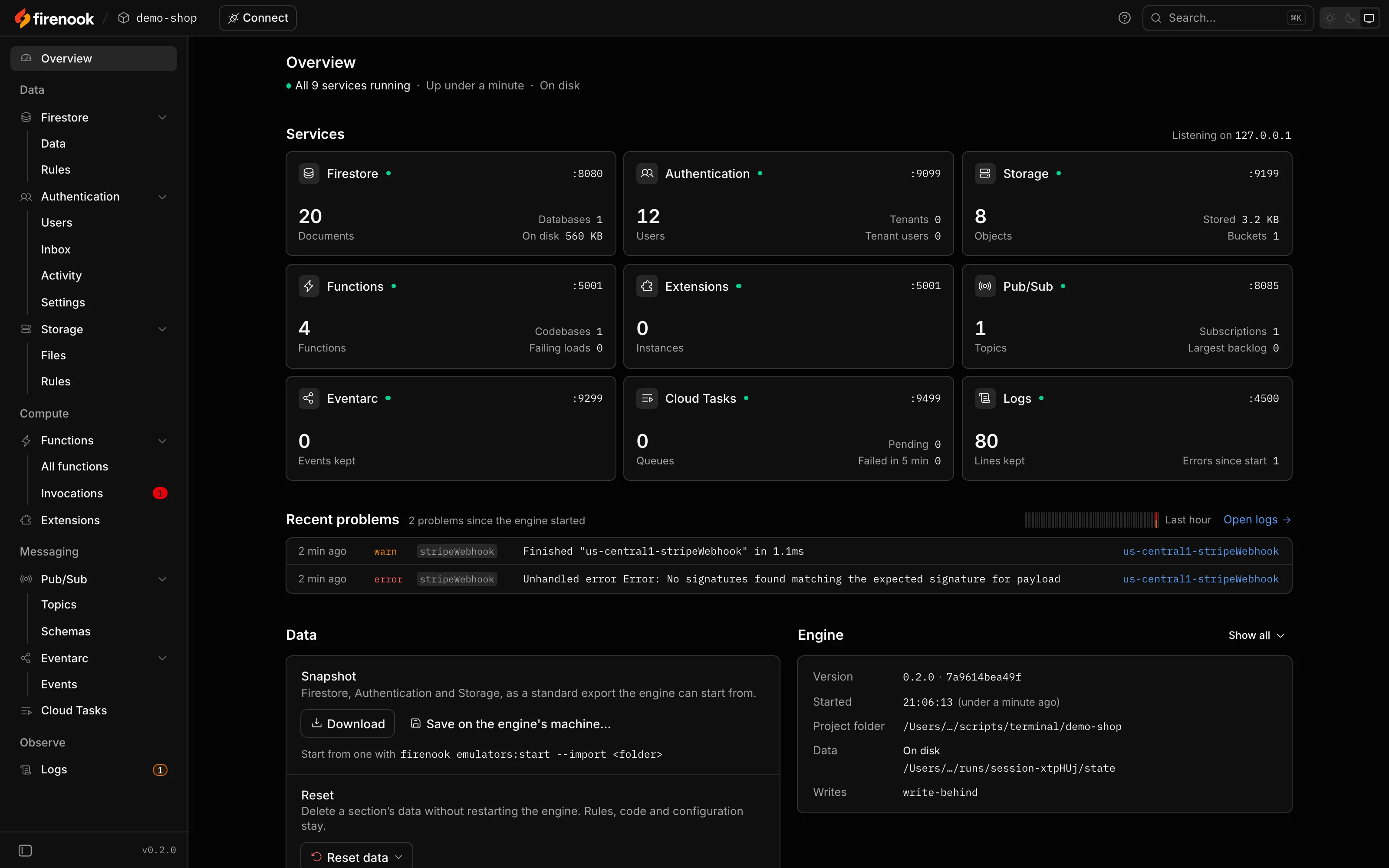
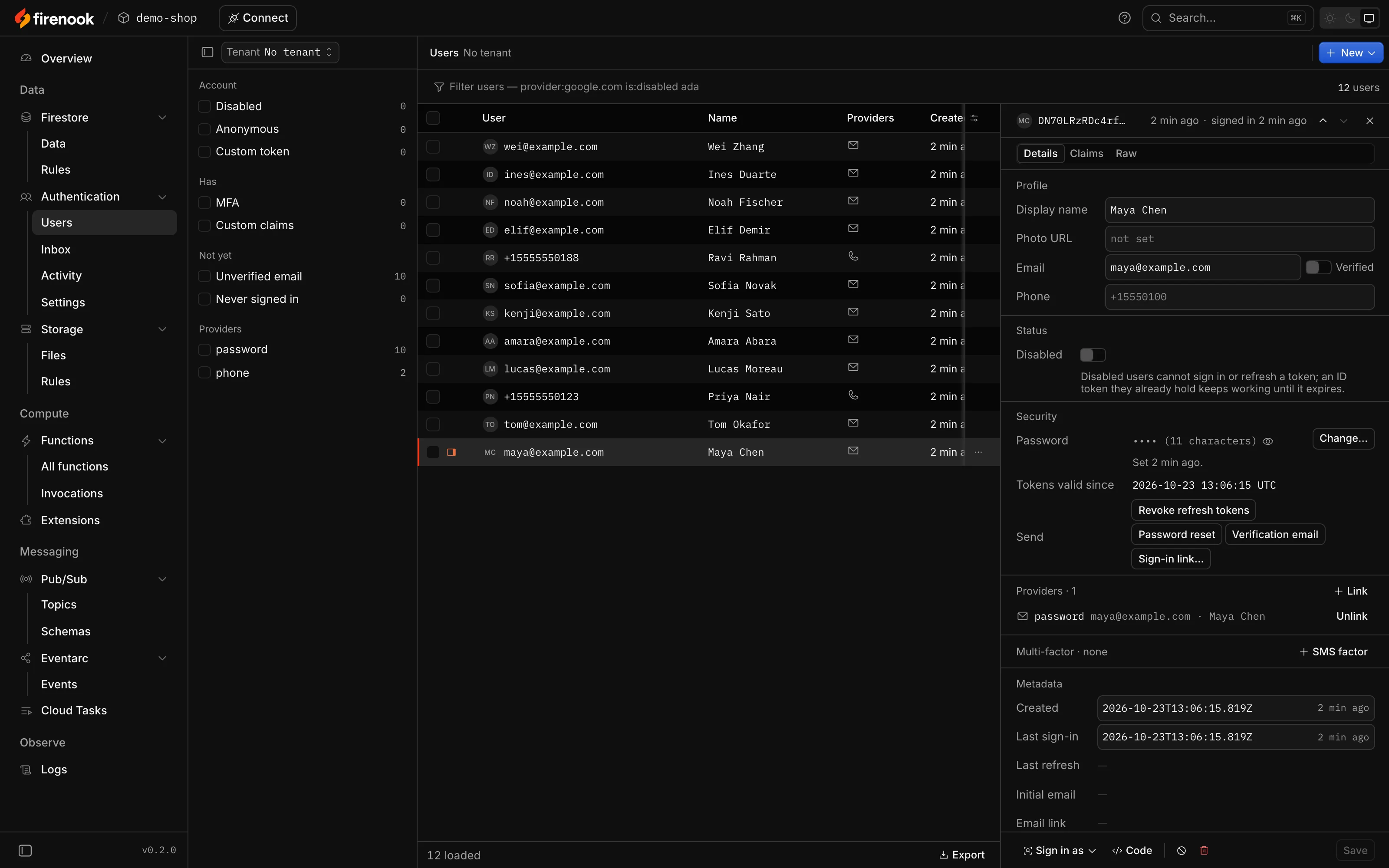
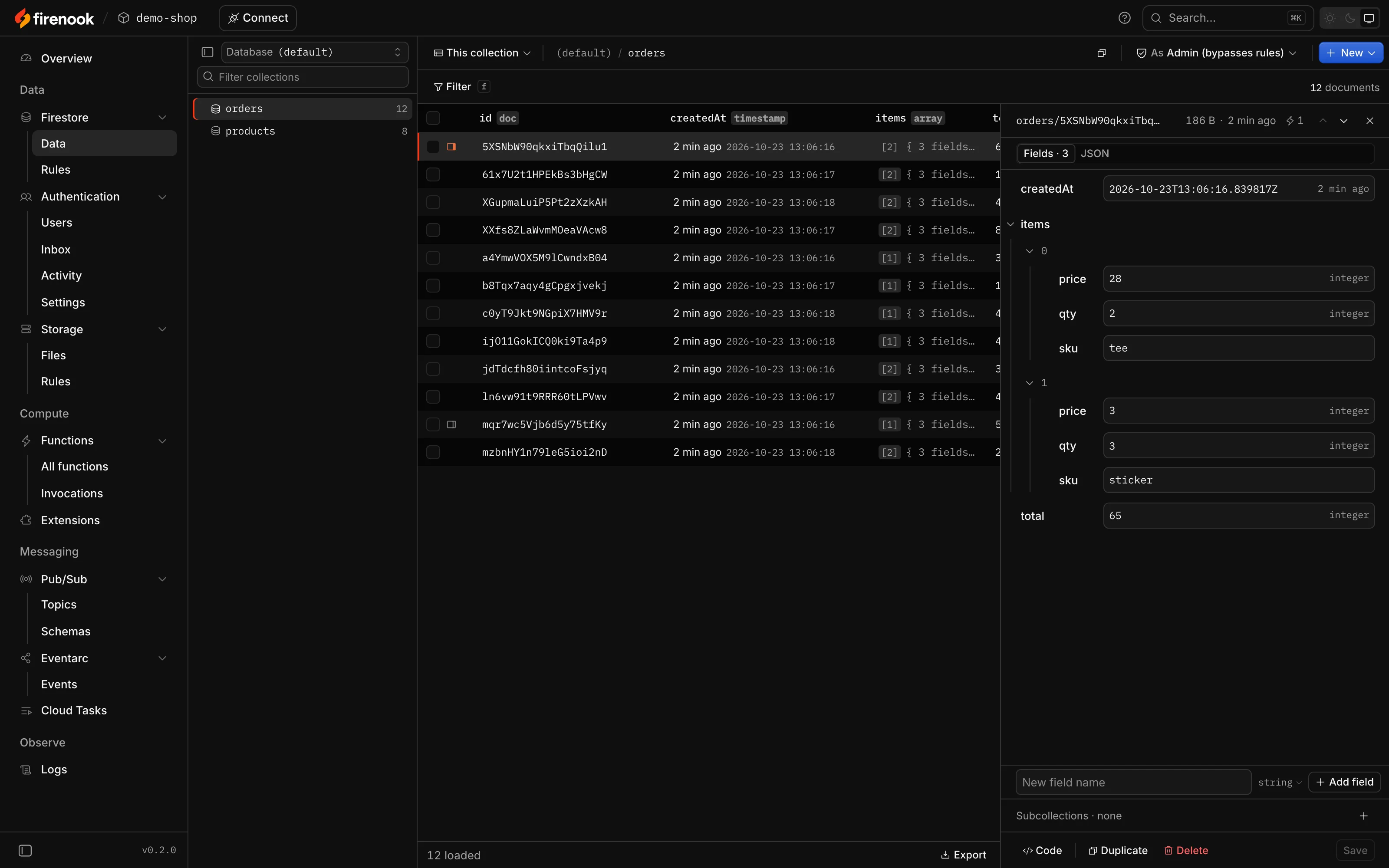
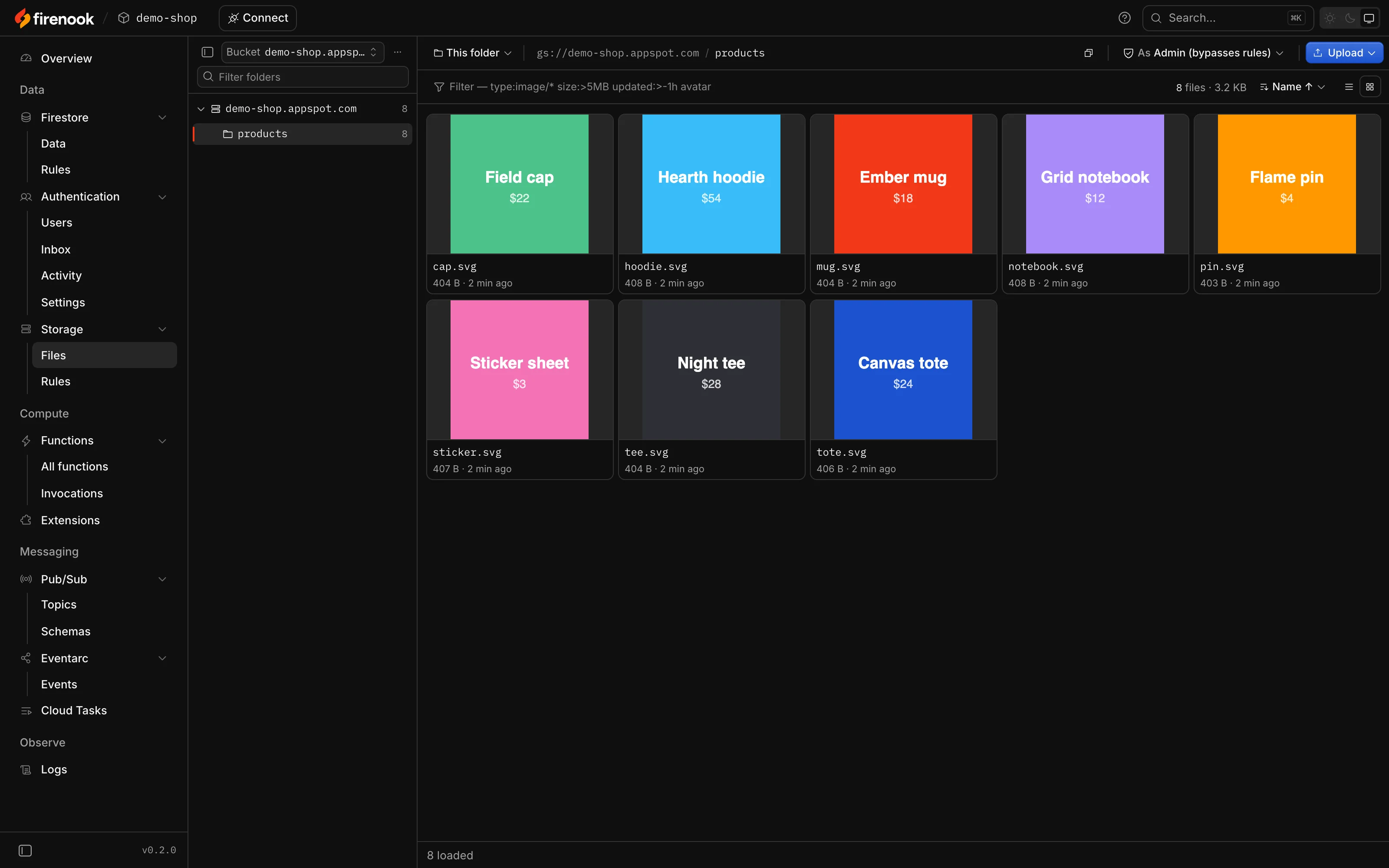
Firenook’s own screen, recorded from 0.2.0 on a demo shop: it starts with the 1.2 million documents, 64,000 users and 5,400 files it kept from its last run, takes two orders, and shows a webhook that fails, with its stack trace.

Change one word

Same flags, same ports, same export format. Your project stays as it is, and firebase-tools stays for deploying.

package.json
-  "emulators": "firebase emulators:start --import ./data"+  "emulators": "firenook emulators:start --import ./data"
  • firebase.json and .firebaserc

    Read the way the Firebase CLI reads them.

  • Rules, indexes, Functions

    Your code and config stay as they are.

  • Your SDKs

    connectFirestoreEmulator, FIRESTORE_EMULATOR_HOST and the rest connect unchanged.

  • Your data

    Imports and exports the official format, both ways.

Eight emulators, on the ports you already use

Your SDKs connect to them as they connect to Google’s: the same hosts, the same ports, the same environment variables.

Firestore

8080

Native and web SDKs, realtime listeners, Security Rules, named databases, and the official import and export.

orders12 documents
  • XXfs8ZLaWvmMOeaVAcw8
  • 5XSNbW90qkxiTbqQilu1
  • mqr7wc5Vjb6d5y75tfKy
  • ijO11GokICQ0ki9Ta4p9
  • c0yT9Jkt9NGpiX7HMV9r
createdAt
2026-10-23 13:06:17.872 UTC
items
[{ price: 54, qty: 1, sku: "hoodie" }, { price: 28, qty: 1, sku: "tee" }]
total
82

Authentication

9099

Every operation of the official Auth emulator: password, email link, phone, MFA, passkeys, tenants and blocking functions.

Users12
  • Amara Abaraamara@example.compassword
  • Elif Demirelif@example.compassword
  • Ines Duarteines@example.compassword

Cloud Storage

9199

The Firebase and Cloud Storage APIs, with Security Rules evaluated natively, firestore.get() included.

demo-shop.appspot.com / products8 files
  • cap.svgimage/svg+xml404 B
  • hoodie.svgimage/svg+xml408 B
  • mug.svgimage/svg+xml404 B

Cloud Functions

5001

HTTP, callable and streaming functions, and every trigger: Firestore, Storage, Auth, Pub/Sub, Eventarc, schedules and task queues. Code reloads on save.

Function calls25
TimeFunctionTriggerSummaryStatusDuration
13:06:19stripeWebhookhttpPOST /5001.1 ms
13:06:18sendReceiptfirestoreorders/mzbnHY1n79leG5ioi2nD created2001.8 ms
13:06:18checkouthttpPOST /2016.3 ms
13:06:18sendReceiptfirestoreorders/c0yT9Jkt9NGpiX7HMV9r created2001.7 ms
13:06:18checkouthttpPOST /2015.0 ms

Pub/Sub

8085

Every RPC over gRPC and HTTP/JSON: push, ordering, filters, dead-letter topics, seek, snapshots and schemas.

nightlyReport, every day 02:00: next run 2026-10-24 02:00 UTC

Cloud Tasks

9499

Queues for onTaskDispatched, with the official retry and rate-limit behaviour.

Eventarc

9299

Custom events delivered to onCustomEventPublished, and the Firebase services’ own.

Extensions

5001

Extensions from local, vendored or registry sources, offline once vendored.

The orders, users, files and calls above are from a run of the demo project, as Firenook returned them. Realtime Database, Hosting, App Hosting and Data Connect are not emulated; a firebase.json that configures them still starts, with a warning. What each service covers.

Measured on a real application

Two hours of a production app’s traffic against each emulator in turn, every operation timed by the client.

Memory at peak

10× less

Official
22.6 GiB
Firenook
2.11 GiB

Write, median

40× faster

Official
208 ms
Firenook
5.1 ms

Listener update, median

19× faster

Official
209 ms
Firenook
11 ms

Restart with data kept

52× sooner

Official
30.8 s
Firenook
0.59 s

orderBy, limit 20

8× faster

Official
96.3 ms
Firenook
12.0 ms

CPU over two hours

61% less

Official
1,586 s
Firenook
616 s

The app holds 211,205 Firestore documents and 6.7 GB in Storage; both emulators ran on one server. Firenook answered 25 of 26 query shapes faster and tied on the last. How it was measured.

Your data stays where you left it

Add --keep-data and Firestore, Auth and Storage come back with all your data in about half a second, even with millions of documents. No export at every stop, no import at every start.

A crash loses at most the last second of writes, where the official emulator loses everything since its last export. A stop always closes the data cleanly.

npx firenook emulators:start --keep-data

Official emulator

Stop: export, 50–57 sStart: import, 21.6–23.6 s

Firenook

Stop, 0.04–0.30 sStart, 0.54–0.57 s

Stopping with the data saved, then starting again with it, on one time scale. The dim blocks are the spread between the fastest and the slowest runs.
$ npx firenook emulators:exec "node --test checkout.test.mjs"
firenook: Starting emulators: auth, functions, firestore, pubsub, storagefirenook functions: Loaded functions definitions from source: checkout, sendReceipt, stripeWebhook, nightlyReport.All emulators ready✔ checkout takes an order (173.227708ms)ℹ pass 1ℹ fail 0firenook suite stopped cleanly
exit 01.39 s from start to stop, the test included
A run of the demo project’s test through firenook emulators:exec on firenook 0.2.0, with some lines left out.

Run your tests against it

emulators:exec starts the suite, runs your command once everything is ready, with the emulator variables set, then stops and passes on the exit code.

CI gets plain lines, the same ones the official emulator prints, and there is no Java to set up first. Firenook needs only Node 24.

npx firenook emulators:exec "npm test"

The console the Firebase emulators should have had

Google’s Emulator UI has no page for your Functions, Pub/Sub, Cloud Tasks or Eventarc, only a log. Firenook’s console covers every service it runs, live, on the Emulator UI’s port.

Every call, with what triggered it, its outcome, its duration and its logs.

The console’s function calls: every call with its time, function, trigger, summary, outcome and duration, one of them a 500

Light and dark, works offline, sends nothing anywhere. Bookmarks to the official UI’s pages open the matching console page. Every page of the console.

Give your agent the emulator, not production

firenook mcp gives a coding agent 54 tools over the running suite. It reads the log and each function call with its error, asks the Security Rules why a request is denied, and works with your data. Nothing leaves your machine.

npx firenook mcp add

Sets it up for Claude Code, Cursor and VS Code in the project’s own files. Other agents run npx firenook mcp. How agents use it.

  1. You

    The Stripe webhook answers 500 on my machine. Why?

  2. functions_list_calls outcome: "failed"

    failed
    500 stripeWebhook http POST /, 1.15 ms at 13:06:19
  3. functions_get_call id: "e72ca3-25"

    error
    Error: No signatures found matching the expected signature for payload
    at
    functions/index.js:24:11
    headers
    host, connection, content-type, accept, accept-language, sec-fetch-mode, user-agent, accept-encoding, content-length
    body
    {"type":"checkout.session.completed"}
  4. rules_evaluate service: "storage", method: "create", path: "products/mug.svg"

    verdict
    deny as unauthenticated
    line 9
    allow read, write: if false;
The question is an example. The tool calls and their answers are from a run of the demo project on firenook 0.2.0, as Firenook gave them.
Firestore
Read, query, count, write and delete documents
Authentication
Manage users, read sign-in codes, mint ID tokens, set claims
Storage
List, read, upload, copy, move and delete files
Functions and logs
Invoke a function, read each call and the log, replay a call after a fix
Security Rules
Ask why a request is denied, test a draft, list denials
Pub/Sub, Tasks, Eventarc
Publish, peek, run tasks and schedules now, replay events

Questions

Something else? Ask on GitHub, or read the docs.

Do I still need firebase-tools?

Yes, for deploying and everything else the Firebase CLI does. Firenook replaces only the emulators: install it next to firebase-tools and run your emulators with it.

Does Firenook need Java?

No. Its services are native code in one npm package, with an engine for macOS, Linux and Windows, and nothing else is downloaded at install or start. Node 22, 24 or 26 runs your Functions, as it does in production.

Can I go back to the official emulator?

Yes. Firenook imports and exports the official format. While Firenook runs, export with npx firenook emulators:export ./export, then start the official emulator with --import ./export.

Which services does it emulate?

Firestore, Authentication, Cloud Storage, Cloud Functions, Extensions, Pub/Sub, Cloud Tasks and Eventarc. Realtime Database, Hosting, App Hosting and Data Connect are not emulated; a firebase.json that configures them still starts, with a warning.

Is it ready for my team?

0.2.0 is the first release for public use. Every release passes conformance replays against the official emulator and packed installs on all five platforms, and Firenook passed a two-hour benchmark against the official emulator on a real application. Commit your lockfile and upgrade on purpose.

Is it free?

Yes. Firenook is open source under the Apache License 2.0.

Is Firenook made by Google?

No. Firenook is an independent open-source project, not affiliated with or endorsed by Google. Firebase is a trademark of Google LLC.

Switch in three steps

One package, nothing else to install: Node 22, 24 or 26 on macOS, Linux with glibc 2.28 or newer, or Windows x64. Starting a new project instead? npx firenook init sets one up.

  1. Install it next to firebase-tools

    Keep firebase-tools for deploying: Firenook has no deploy or login command.

    npm install --save-dev firenook
  2. Check your project

    This reads firebase.json the way the Firebase CLI does, and changes nothing.

    npx firenook init --adopt --dry-run
  3. Swap the command

    Same flags and ports, so your app connects as before and your data imports as it is.

    npx firenook emulators:start